Signing up to Auto-Renew Online
Member HubYou can now opt in for your membership to renew automatically with us, so you no longer need to worry about your membership expiring. Auto-renewals allow you to securely save a payment card with us and have your annual membership payment automatically come out of your account, with no need for you to worry about manually re-purchasing it.
There are only four simple steps you need to take to opt in for auto-renewals. You can complete these steps now and your membership automatically renews when you're membership is due to end. Alternatively, give our Box Office team a call and they can opt you in for auto-renewals!
Opting in for auto-renewals online:
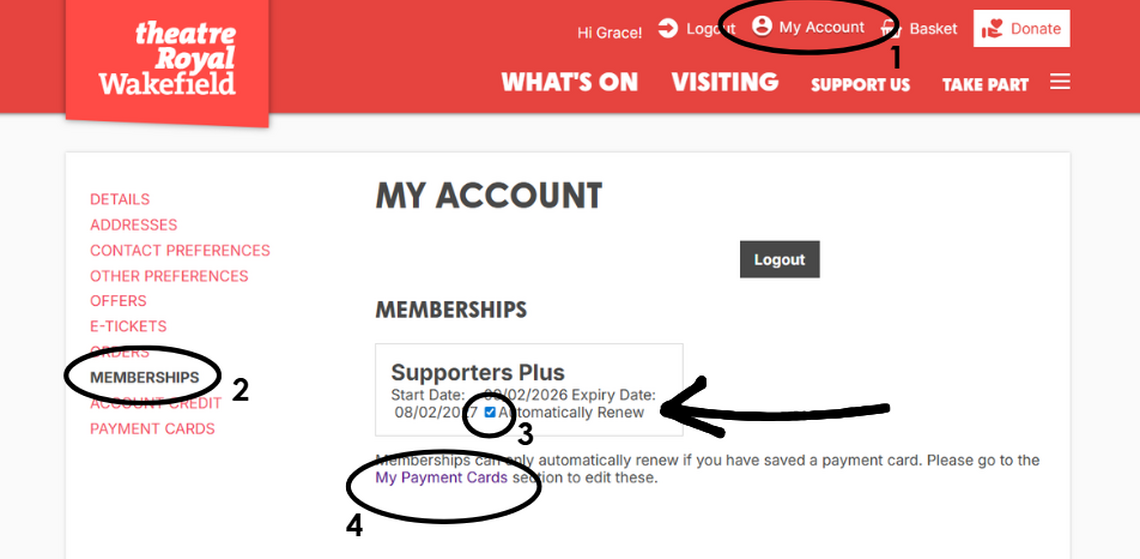
1. Log into your account with us on our website and Click 'My Account' at the top of the page.
2. Click the 'Memberships' option in the left hand side list.
3. Tick the 'Automatically Renew' option in the box that appears with your membership details.
4. Go to 'My Payment Cards' and ensure that you have saved a payment card. This is crucial to allowing the auto-renewal to go through.
We've included a handy image guide below to show you where to access each step of the opting in process. If you have any questions or issues, please call our Box Office team or email development@theatreroyalwakefield.co.uk.