Cancelling your Auto-Renewal Online
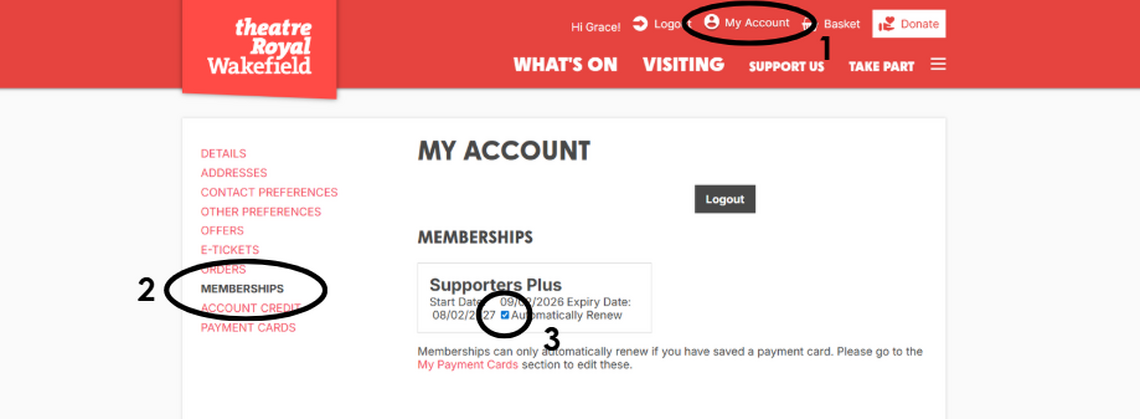
Member HubYou can opt out of auto-renewing your membership with us online. To cancel your auto-renewal, you just need to follow the four simple steps listed below. We have included an image below as a guide to where you can locate each step of the cancellation.
Please remember that your membership fee will automatically be taken out of your account on your renewal date. You will receive an email from us 30 days before this date as a reminder.
Cancelling your membership on our website:
1. Log into your account with us on our website and click 'My Account' at the top of the page.
2. Click the 'Memberships' option in the left hand side list.
3. Untick the 'Automatically Renew' option in the box that appears with your membership details.
Please ensure you have refreshed the page and confirm that the box is now unticked.
Having any issues cancelling your auto-renewal online? Call our Box Office team via 01924 211 311 or email development@theatreroyalwakefield.co.uk to cancel your auto-renewal.*
* Please bear in mind there may be a two to three day delay in us being able to cancel your membership if you contact us via email or phone, as there are limitations to our Box Office and office hours. We would recommend emailing/calling us at least five days before your membership is due to renew in order for us to cancel it in time before your payment is taken out.